
Managing Previous Year Leave in HRLocker
As part of HRLocker’s recommended year-end process, it’s important to ensure all leave is correctly submitted and approved before the end of the year. This guide explains how HRLocker manages annual leave that falls into the previous leave year and how managers can ensure balances and carryover remain accurate.
Best Practice Before Year End
To ensure accurate year-end reporting:
-
All employees should submit any outstanding annual leave requests before the end of the leave year.
-
Managers should review and approve all pending leave requests before year end.
This ensures that carryover calculations and leave balances are correct going into the new leave year.
Submitting Leave for the Previous Year (After Year End)
If an employee forgets to submit leave before the year ends, HRLocker still allows:
-
Employees to submit annual leave dated in the previous leave year.
Their request will appear to their manager for approval as normal.
Approving Leave for the Previous Year
When a manager approves annual leave that falls into the previous leave year, HRLocker displays a confirmation pop-up with two options:
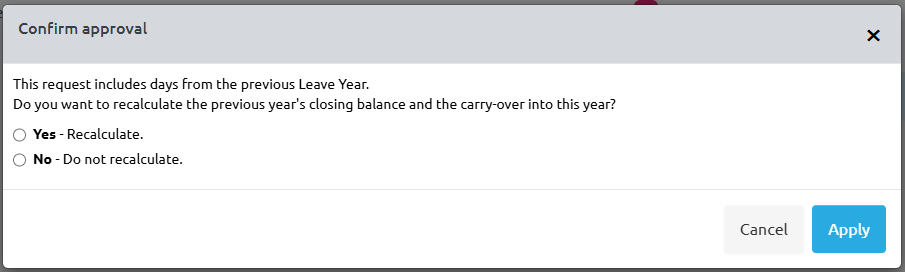
Selecting Yes will:
-
Recalculate the employee’s leave balance for the previous year.
-
Recalculate carryover into the new leave year if the updated balance affects it.
-
Update all relevant totals and reports accordingly.
Selecting No will:
-
Approve the leave request.
-
Leave previous year balances and carryover unchanged.
-
Use the updated leave only for record-keeping, not recalculation.
- This option is helpful if:
-
Year-end payroll is already finalised.
-
The organisation prefers manual adjustment rather than automatic recalculation.
-
- This option is helpful if:
Deleting Annual Leave for the Previous Year
If a manager deletes an annual leave entry that falls into the previous leave year:
-
The same recalculation pop-up will appear.
-
Managers must again choose whether HRLocker should recalculate balances and carryover.
This ensures consistency for any change affecting a completed leave year.
Recommended
-
Remind all employees to submit outstanding leave requests before year end.
-
Managers approve all outstanding requests.
-
After year end:
-
Only approve or delete previous-year leave with care, considering payroll and carryover impacts.
-
Choose recalculate if the change should affect balances.
-
Choose do not recalculate if year-end values should remain unchanged.
-