
All your time off is requested from the Time Off section. Your request goes to your manager, and you'll get an email when it's decided.
Request leave
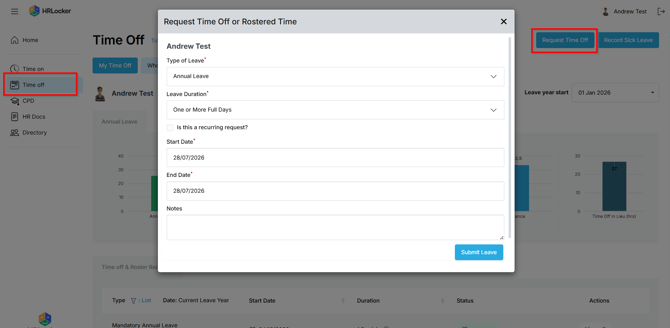
- Open Time Off.
- Click Request Time Off and fill in the details: leave type, dates and duration.
- The leave types you see depend on what's set up for your office.
What happens next
- Your request appears in your Time Off logs as Submitted.
- Your manager approves or rejects it, and you get an email either way. The log updates too.
- You can delete your own request while it's still Submitted. Once it's approved, ask your manager to remove it.
Recurring leave
For things like parental leave, study leave or rostered time off:
- Tick Is this a recurring request? on the request form.
- Choose the leave type and duration, for example Half Day PM.
- Pick a Weekly or Monthly pattern, the days it recurs on, a start date, and either an end date or a number of occurrences.
- Your request goes to Awaiting Approval. Recurring leave set up by your manager is approved automatically.
- Individual days or the whole series can be deleted later if plans change.
How your leave duration is calculated
- Working days come from your work pattern. Days you don't work, and public holidays, don't use up leave.
- The start and end dates are both included: leave that starts and ends on the same day counts as one day.
- Daily leave is booked in full or half days. Hourly leave uses exact start and end times.
- If a calculation looks wrong, ask your manager to check your work pattern and your office's public holidays.